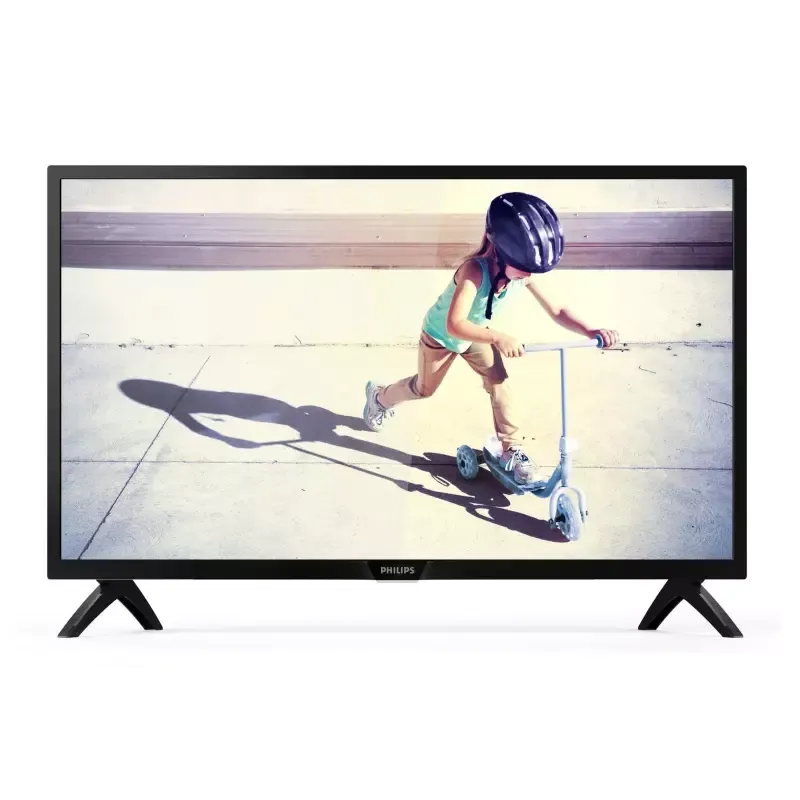

Manuals of product 42PFS4012




Editorial note
The Philips 42PFS4012 television stands out with its Full HD resolution of 1920 x 1080 pixels, providing a pleasant and immersive display quality for users. The use of LED display technology ensures superior brightness, even in varied environments, while the versatile connectivity with three HDMI ports allows for easy connection of multiple multimedia devices. Additionally, its energy-efficient design, with low power consumption in standby mode, contributes to significant savings on electricity bills. The VESA mount support is also an advantage, facilitating installation and space optimization. However, some drawbacks are worth noting. The lack of Smart TV features limits access to online streaming services, which may disappoint users looking for a connected experience. Furthermore, the audio power of 16 W may seem insufficient for larger spaces, suggesting that the addition of external audio systems might be necessary. The Full HD resolution, while still acceptable, may appear outdated in light of the rising popularity of 4K televisions. The absence of Ethernet ports and Wi-Fi connectivity also restricts its integration with other connected devices. In terms of scores, the user experience is satisfactory, reaching 70, thanks to a simple interface and a quick start guide. Display performance is good, with a score of 75, although the audio power may pose an issue. The energy-efficient design is remarkable with a score of 90, followed by a modern design rated at 85. The value for money is fair, with a score of 78, but the features are deemed limited, receiving a score of 65. Finally, ease of use is appreciated, with a score of 80, although modern users may find some limitations. Overall, the Philips 42PFS4012 is a good choice for those looking for a simple television with decent image quality, but it may not meet the needs of users seeking more advanced features.Score details
User experience
The user experience is generally satisfactory thanks to a simple interface and a quick start guide, but the lack of Smart TV features can be a drawback.
Performance
The display performance is good with a Full HD resolution, but the audio power of 16 W may not be sufficient for larger spaces.
Battery life
The energy-efficient design of the device allows for low power consumption in standby mode, contributing to savings on the electricity bill.
Design
The design is modern and practical with a VESA mount support, allowing for easy and flexible installation.
Value for money
The value for money is fair, although the Full HD resolution may seem insufficient compared to current 4K TV standards.
Features
Although the TV offers versatile connectivity with three HDMI ports, the lack of Ethernet ports and Wi-Fi limits integration with other connected devices.
Usability
The use of the product is generally simple, but modern users may find the features limited compared to other models.
Advantages
Full HD resolution for a sharp image
LED technology for high brightness
Three HDMI ports for easy connectivity
Reduced power consumption in standby
VESA mount for flexible installation
Disadvantages
No Smart TV features
16 W audio insufficient
Full HD resolution, not 4K
No Ethernet ports or Wi-Fi
Maximum brightness of 250 cd/m²
Technical Specifications 42PFS4012
General Information
-
Model42PFS4012
-
Brand
-
Category
-
Type
-
SKU869705
-
MPN869705
Screen
-
Interpolation movement technology-
-
Screen resolution1920 x 1080 pixels
-
Screen brightness250 cd/m²
-
Maximum brightness report65 %
-
Screen size42 "
-
Screen diagonal (cm)107 cm
-
Display technologyLED
-
Type HDFull HD
-
Response time- ms
-
Screen format settings4:3, 16:9, Zoom
-
Screen shapeFlat
-
Image format16:9
Audio
-
Number of speakers-
-
Rated power of RMS16 W
Connectivity
-
Quantity of DVI-D ports-
-
S-Video Input-
-
Number of USB 3.2 Gen 1 (3.1 Gen 1) type A ports-
-
Quantity of USB 2.0 Ports-
-
Number of Ethernet LAN ports (RJ-45)-
-
Headset output1
-
Quantity of HDMI ports3
-
PC audio inputYes
-
Headset output1
-
Headset output1
-
PC audio inputYes
-
PC audio inputYes
-
Headset output1
-
Headset output1
-
Consumer Electronics Control (CEC)EasyLink
-
Common Interface (CI)No
-
Common Interface (CI)No
Power
-
Energy consumption (standby mode)0.5 W
-
Electricity consumption (stop)0.3 W
-
AC input voltage220 - 240 V
-
AC input frequency50 - 60 Hz
-
Typical electricity consumption56 W
Weight and dimensions
-
Device width (support included)947 mm
-
Depth (without support)77.6 mm
-
Height (without support)529 mm
-
Device width (support included)947 mm
-
Depth (support included)224 mm
-
Height (support included)608.7 mm
-
Weight (without support)8400 g
-
Weight (with support)8600 g
Packaging information
-
Package weight10500 g
-
Package depth150 mm
-
Package height660 mm
-
Package width1055 mm
-
Warranty cardYes
-
Warranty cardYes
Other features
-
Energy efficiency class (old)A
-
Annual energy consumption82 kWh
-
Batteries includedYes
-
Number of USB ports1
-
3D CompatibilityNo
-
Batteries includedYes
-
Batteries includedYes
-
Battery typeAAA
-
Number of supported batteries2
Design
-
Built-in power button-
-
VESA mountYes
-
Product colorBlack
-
VESA mountYes
-
VESA standard300 x 200 mm
-
Mercury content0 mg
Environmental conditions
-
Operating temperature5 - 35 °C
Technical details
-
Number of CVBS1
Representation / realization
-
Subtitle functionYes
-
Subtitle functionYes
-
Teletext1000 pages
-
Standard teletextHyper-text
-
Subtitle functionYes
-
Supported subtitle formatASS, SMI, SRT, SSA, SUB, TXT
-
Visual compression formatsAVC, AVI, H.264, H.265, HEVC, MKV, MPEG1, MPEG4
-
Supported video formatAVC, AVI, H.264, H.265, MKV, MPEG1, MPEG4
-
Supported image formatsBMP, JPG, PNG
-
Supported audio formatsAAC, AC3, LPCM, MP3
-
HDR supportNo
Management features
-
Automatic power cut-offYes
-
Firmware upgrade viaAuto upgrade wizard, USB
-
Automatic power cut-offYes
-
Programming period8 day(s)
-
Automatic power cut-offYes
-
Automatic power cut-offYes
-
Automatic power cut-offYes
TV Tuner
-
Tuner typeAnalog and digital
-
Analog signal format systemNTSC, PAL, SECAM
-
Digital signal system formatDVB-C, DVB-S, DVB-S2, DVB-T, DVB-T2, DVB-T2 HD
Packaging contents
-
Desktop supportYes
-
Cables includedSector
-
Desktop supportYes
Network
-
WifiNo
-
WifiNo
Smart TV / smart TV
-
Smart TV-
-
Internet TVNo
Frequently Asked Questions
What is the recommended viewing distance for my Philips TV?
What should I do if my TV is no longer receiving a signal?
What are the dimensions of the screen on my TV?
What does the acronym HDMI stand for?
Is it possible to connect Bluetooth devices from different brands?
What is the screen size of the Philips 42PFS4012 model?
What is the resolution of the screen on the Philips 42PFS4012?
Does the Philips 42PFS4012 offer a display resolution of 1920 x 1080 pixels?
What is the RMS nominal power of the Philips 42PFS4012?
How many component video input ports (YCbCr) does the Philips 42PFS4012 have?
What is the power consumption in standby mode of the Philips 42PFS4012?
How many USB ports does the Philips 42PFS4012 TV have?
How do I properly install the TV stand for the Philips 42PFS4012?
What are the recommendations for positioning the Philips 42PFS4012 TV for optimal viewing?
How do I connect the power plug and antenna plug to the Philips 42PFS4012 TV?
How do I troubleshoot poor TV reception on the Philips 42PFS4012?
What should I do if the image quality of connected devices on the Philips 42PFS4012 is poor?
How do I correct the misalignment of the image on the Philips 42PFS4012 TV?
What should I do if the sound quality is poor on the Philips 42PFS4012 TV?
How do I troubleshoot HDMI device issues on the Philips 42PFS4012 TV?
What should I do if the computer display is unstable on the Philips 42PFS4012 TV?
How do I properly install the TV stand for the Philips 42PFS4012?
What are the recommendations for optimal positioning of the Philips 42PFS4012 TV?
How do I connect the power plug and antenna plug to the Philips 42PFS4012 TV?
How do I improve TV reception and resolve image issues on the Philips 42PFS4012?
What should I do if I encounter sound, HDMI connection, or computer issues with the Philips 42PFS4012?
Is the manual for the Philips 42PFS4012 available in French?
Similar products


More product categories from brand Philips
Audio Philips
Home appliances Philips
Personal care Philips
Household appliances Philips
Interior Philips
Phones Philips
Other Philips
Garden and outdoor Philips
Software Philips
More product types from brand Philips


Presentation of product 42PFS4012 specifications from brand Philips
General Information
The Philips 42PFS4012 television, a reference from the Philips brand, is recognized for its quality and innovations in the field of electronic devices. This model, identified by the number 42PFS4012 | 42PFS4012/12, is designed to deliver optimal performance and an enriching user experience. The EAN code, 8718863011195, allows for unique identification of the product in distribution systems.
Screen
The Philips 42PFS4012 features a 42-inch (107 cm) screen with a resolution of 1920 x 1080 pixels, ensuring excellent display quality for all your content. Its brightness reaches 250 cd/m², providing adequate visibility even in bright environments. With a maximum contrast ratio of 65 %, the screen offers a pleasant visual experience. The LED display technology optimizes clarity and color vibrancy, and the fast response time promotes a smooth experience. The screen format adjustment offers options such as 4:3, 16:9, and Zoom, allowing customization according to viewing preferences.
Audio
Regarding audio, the Philips 42PFS4012 is equipped with a sound power of 16 W RMS, ensuring satisfactory sound quality for everyday use. While this power may be suitable for smaller spaces, an external audio system could be considered for an immersive experience in larger rooms.
Connectivity
This model offers versatile connectivity with three HDMI ports, a VGA (D-Sub) port, and a PC audio input, facilitating the connection of various multimedia devices. It also features a digital optical audio output for high-quality audio transmission. However, it does not offer Ethernet ports or Wi-Fi connectivity, which limits its integration with connected devices. A DVI port is present, ensuring compatibility with digital devices.
Power
The Philips 42PFS4012 is designed to be energy-efficient, with a power consumption of 0.5 W in standby mode and 0.3 W when turned off. Its typical power consumption is 56 W, and it operates on an input voltage of 220 - 240 V.
Weight and Dimensions
The dimensions of the television are optimized for easy integration: 947 mm wide, 529 mm high, and 77.6 mm deep without the stand. Weighing 8400 g, it is light enough to be easily moved.
Packaging Information
The package weight is 10500 g with dimensions of 150 mm deep, 660 mm high, and 1055 mm wide, ensuring adequate protection during transport. A quick start guide and a warranty card are included, facilitating immediate use of the product.
Other Features
The television has built-in speakers, providing a convenient audio experience. Its energy efficiency class is A, and its estimated annual energy consumption is 82 kWh. The product contains lead, which is a factor to consider for safety. However, it does not support 3D technology.
Design
The Philips 42PFS4012 features a modern and sleek black color. It is compatible with VESA mounting (standard 300 x 200 mm), making wall installation easy. This model does not have a signal strength indicator but is designed for practical use.
Environmental Conditions
For optimal operation, the television is designed to operate within a temperature range of 5 to 35 °C.
TV Tuner
The included tuner type is both analog and digital, compatible with NTSC, PAL, SECAM formats for analog signals, and DVB-C, DVB-S, DVB-S2, DVB-T, DVB-T2, DVB-T2 HD for digital signals, thus ensuring a complete viewing experience.
Contents of the Package
The product comes with a remote control and a power cable, making installation and use easy right from the purchase.
Smart TV
This model does not have Smart TV features, limiting access to streaming services and the Internet.


