

Manual of product 32FHD7900
Editorial note
The TCL 32FHD7900 is a television that stands out for its exceptional picture quality thanks to a Full HD resolution of 1920 x 1080 pixels. This allows for sharp details and vibrant colors, providing an immersive viewing experience. Additionally, its compatibility with various broadcasting formats, thanks to its analog and digital tuner, enhances the viewing experience by offering a wide range of channels. The modern black design, with the option for VESA mounting, makes it easy to integrate into different spaces. However, the product has some drawbacks. The lack of Smart TV features limits access to streaming apps and online content, which may disappoint some users. Furthermore, its energy efficiency class F indicates relatively high energy consumption, potentially leading to higher operating costs. The absence of support for HDR technology may also reduce the visual impact for certain content. Finally, the limited number of HDMI ports (2) may not be sufficient for those looking to connect multiple devices simultaneously. In terms of performance and user experience, the TCL 32FHD7900 receives satisfactory scores, with a rating of 75 for performance and a rating of 70 for user experience. The design is particularly appreciated with a score of 85. However, connectivity is a weak point, rated at 65, due to the limited number of HDMI ports. The provided documentation is deemed satisfactory, although more comprehensive online support would be desirable to assist users. Overall, the TCL 32FHD7900 offers good value for money for a basic television, particularly suitable for those seeking a traditional viewing experience without modern smart features.Score details
User experience
The user experience is generally satisfactory, although the lack of Smart TV features limits access to certain online content.
Performance
The picture quality is exceptional with Full HD resolution, but the absence of HDR support may reduce the visual impact of some content.
Design
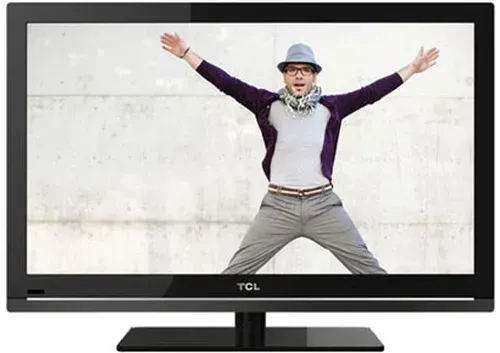
The modern black design is attractive, and the VESA mount option makes it easy to integrate into various spaces.
Value for money
The TCL 32FHD7900 offers good value for money for a basic television, but the energy efficiency class F could lead to higher operating costs.
Features
Connectivity options, including Wi-Fi and Bluetooth, are a plus, but the limited number of HDMI ports may be an issue for users with multiple devices.
Support
The 15-page user manual provides essential information, but more comprehensive online support would be desirable.
Documentation
The documentation is satisfactory, although more usage examples and installation tips would be beneficial.
Advantages
Full HD image 1920 x 1080 pixels
Compatible with various broadcast formats
Built-in Wi-Fi and Bluetooth connectivity
Modern design with VESA mount
Immersive sound with Dolby Digital decoders
Optimized modes for gaming and sports
Disadvantages
No Smart TV features
Energy efficiency class F
No HDR support
Only 2 HDMI ports
Response time and brightness not specified
Technical Specifications 32FHD7900
General Information
-
Model32FHD7900
-
Brand
-
Category
-
Type
-
SKU1856292
-
MPN1856292
Screen
-
Interpolation movement technology-
-
Contrast ratio-
-
Display technology-
-
Screen size32 "
-
Type HDFull HD
-
Screen resolution1920 x 1080 pixels
-
Screen shapeFlat
-
Image format16:9
-
Supported graphic resolutions1920 x 1080 (HD 1080)
-
Screen brightness- cd/m²
-
Response time- ms
-
Marketing name of the dynamic contrast ratioMega contrast
-
Screen diagonal (cm)81.3 cm
-
Maximum brightness report65 %
TV Tuner
-
Tuner typeAnalog and digital
-
Analog signal format systemNTSC, PAL, PAL BG, PAL DK, SECAM
-
Digital signal system formatDVB-C, DVB-S2, DVB-T2
-
Number of tuners1 tuner(s)
Smart TV / smart TV
-
HbbTV (Hybrid Broadcast Broadband TV)Yes
-
HbbTV (Hybrid Broadcast Broadband TV)Yes
-
Installed operating systemAndroid
-
Operating system versionAndroid R (11.0)
-
Smart ModesGame, Sports
-
HbbTV (Hybrid Broadcast Broadband TV)Yes
-
HbbTV (Hybrid Broadcast Broadband TV) version2.0.2
Audio
-
Number of speakers2
-
Rated power of RMS10 W
-
Integrated audio decodersDolby Digital, Dolby Digital Plus
-
Sound modesDolby Audio
-
Automatic volume levelerYes
-
Automatic volume levelerYes
Network
-
Ethernet/LANYes
-
Ethernet/LANYes
-
Ethernet/LANYes
-
Bluetooth ProfilesA2DP, HID
-
Wifi standards802.11b, 802.11g, Wi-Fi 4 (802.11n)
Design
-
Product colorBlack
-
VESA mountYes
-
VESA standard100 x 100 mm
Management features
-
Electronic Program GuideYes
-
Electronic Program GuideYes
-
Electronic Program GuideYes
-
Electronic Program GuideYes
-
Number of OSD languages29
-
Electronic Program GuideYes
Representation / realization
-
Noise reduction-
-
USB Recording-
-
Teletext FunctionYes
-
HDR technology (high dynamic range)High Dynamic Range 10 (HDR10)
-
Teletext FunctionYes
-
Teletext FunctionYes
Connectivity
-
Integrated PC connector (D-Sub)-
-
Quantity of RF ports2
-
HDMI version1.4
-
Headset output1
-
Headset output1
-
Headset output1
-
Number of USB 3.2 Gen 1 (3.1 Gen 1) type A ports0
-
Headset output1
-
HDCPYes
-
HDCPYes
-
Common Interface Plus (CI+) Version1.3
-
HDCPYes
-
HDCPYes
-
Quantity of RF ports2
-
Consumer Electronics Control (CEC)T-link
Power
-
Energy efficiency class (SDR)F
-
Energy efficiency class (HDR)G
-
Energy consumption (SDR) for 1000 hours27 kWh
-
Energy consumption (standby mode)- W
-
Energy consumption (HDR) for 1000 hours45 kWh
-
Energy consumption (standby mode)- W
-
Energy efficiency rangeA to G
Weight and dimensions
-
Device width (support included)716 mm
-
Depth (support included)180 mm
-
Height (support included)467 mm
-
Weight (without support)3400 g
Frequently Asked Questions
What is the recommended viewing distance for my TCL TV?
What should I do if my TV is not receiving a signal?
What are the dimensions of my TV screen?
What does the acronym HDMI stand for?
Is it possible to connect devices from different brands via Bluetooth?
What is the screen size of the TCL 32FHD7900?
What is the resolution of the TCL 32FHD7900 screen?
Is the TCL 32FHD7900 screen flat?
How many tuners does the TCL 32FHD7900 have?
Can the TCL 32FHD7900 be used as a Smart TV?
What is the operating system of the TCL 32FHD7900?
How do I access the menus and adjust my TV using the remote control?
Why is my remote control not working to adjust the volume?
How do I enter channel numbers with the remote control?
How do I access the Android TV home page with the remote control?
What should I do if the remote control does not respond to volume control?
Is the manual for the TCL 32FHD7900 available in French?
Similar products




More product categories from brand TCL
More product types from brand TCL


Presentation of product 32FHD7900 specifications from brand TCL
General Information
The TCL 32FHD7900 is a television from the TCL brand, known for its innovations and quality in the field of household appliances. This model, identified by the EAN code 5901292520373, is designed to deliver optimal performance and an enriching user experience.
Screen
The screen of the TCL 32FHD7900 measures 32 inches, providing an ideal size for an enriching visual experience. With a Full HD resolution of 1920 x 1080 pixels, it ensures sharp images and vibrant colors. Its 16:9 aspect ratio and flat shape make this model suitable for all your multimedia needs. Although brightness and response time are not specified, this television is designed for pleasant visibility in various lighting conditions. The contrast ratio, referred to as "Mega contrast," ensures deep blacks and bright whites for total immersion.
TV Tuner
This model is equipped with an analog and digital tuner, capable of receiving a variety of signals, including NTSC, PAL, and SECAM formats, allowing for extensive compatibility with various channels. It supports digital systems DVB-C, DVB-S2, and DVB-T2, thus providing a smooth viewing experience with the ability to receive multiple channels simultaneously thanks to its single tuner.
Smart TV
The TCL 32FHD7900 is not a smart television and does not offer access to apps or the Internet. However, it is powered by the Android R (11.0) operating system, allowing for simple and intuitive use. It includes specific modes for sports and gaming, optimizing the display according to the type of content. Additionally, it is equipped with HbbTV 2.0.2 technology, allowing access to interactive services and online content, thus enriching the viewing experience.
Audio
This television is equipped with two speakers, providing an audio power of 10 W RMS for a satisfying sound experience. The built-in Dolby Digital and Dolby Digital Plus decoders ensure immersive sound quality. Furthermore, an equalizer and automatic volume leveling allow you to adjust audio settings according to your preferences.
Network
The TCL 32FHD7900 supports Bluetooth, allowing for wireless connection with other devices. It also features a Wi-Fi connection for fast and reliable network access, as well as an Ethernet port for stable wired connections.
Design
With its sleek black finish, the TCL 32FHD7900 easily fits into any modern interior. It is also compatible with VESA mounting, making wall installation easy and contributing to space-saving.
Management
This model includes a sleep timer to save energy when not in use. It also offers a hotel mode, simplifying the management of bookings and services in commercial environments. The on-screen display (OSD) is available in 29 languages, making it accessible to a wide audience.
Connectivity
The TCL 32FHD7900 is equipped with two HDMI ports (version 1.4) and one USB 2.0 port, allowing for easy connection of various multimedia devices. It also has a digital optical audio output, ideal for external audio systems. Compatibility with Common Interface Plus (CI+) and Audio Return Channel (ARC) facilitates connection with other devices.
Power
The energy efficiency class (SDR) of the TCL 32FHD7900 is F, indicating relatively high energy consumption. Its energy consumption is 27 kWh for 1000 hours of use. In HDR mode, the consumption is 45 kWh for the same duration. These elements highlight the importance of considering the energy impact when using this model.
Weight and Dimensions
The TCL 32FHD7900 measures 716 mm in width, 180 mm in depth, and 467 mm in height, including the stand, facilitating its integration into various spaces. With a weight of 3400 g, it remains relatively lightweight, making transport and installation easier.


