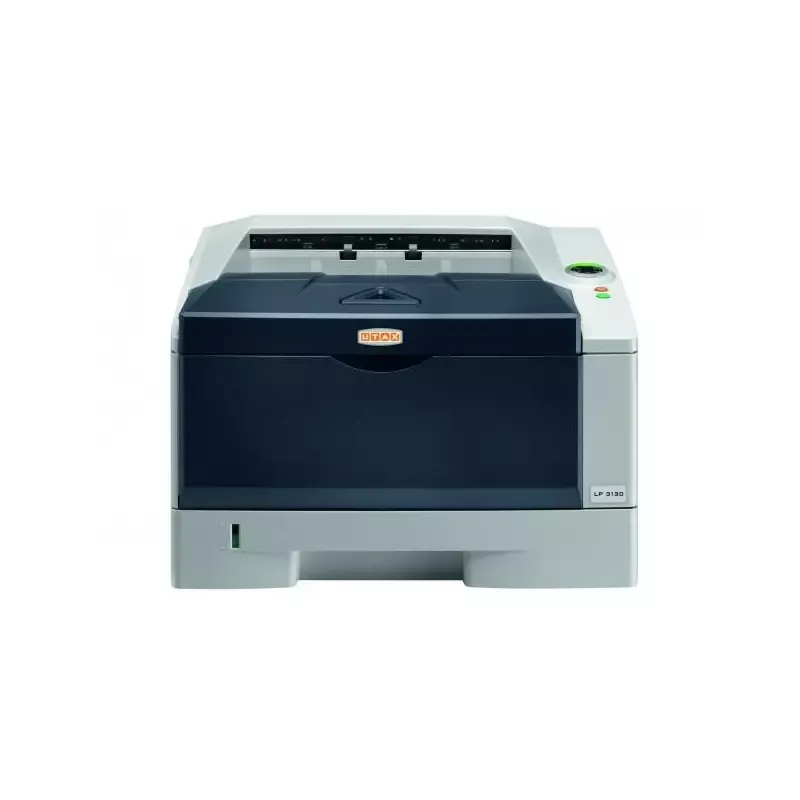

Manual of product P-3520D
Editorial note
The Utax P-3520D printer stands out with its impressive printing speed of 30 pages per minute, making tasks easier in demanding work environments. Its built-in duplex printing feature optimizes resource use, contributing to a significant reduction in paper waste. Additionally, the laser printing technology ensures exceptional quality with a maximum resolution of 600 x 600 DPI, perfect for professional documents. The 250-sheet paper capacity ensures smooth print management without interruption, and the integrated memory card reader offers a convenient solution for data storage and management. However, a few drawbacks are worth mentioning. The lack of Ethernet and Wi-Fi connectivity may limit connection options for users wishing to print wirelessly from multiple devices. Furthermore, while the duplex printing speed of 17 ppm is acceptable, it is lower than that of some competing models, which could slow down workflow during high-volume printing. The 32 MB internal memory may also prove insufficient for users with significant printing needs. Finally, weighing 12 kg, the printer may be difficult to move, especially in tight workspaces. In terms of scores, the user experience is rated satisfactory with a score of 75, while the overall performance of the printer reaches 80. The design is considered functional but penalized by its weight (score of 70). The value for money is fair with a score of 78, although some limitations may affect heavy users. The features, including laser printing technology and the memory card reader, are well-rated (score of 82), while ease of use is appreciated with a score of 76. The user manual receives an excellent score of 85, reflecting the quality of the provided documentation. In summary, the Utax P-3520D is a high-performing printer, suitable for office needs, but its lack of wireless connectivity and certain limitations in memory and weight may not suit all users.Score details
User experience
The user experience is generally satisfactory, with fast printing speed and practical features such as built-in duplex printing. However, the lack of wireless connectivity may be a drawback for some users.
Performance
The printing performance is solid, with a speed of 30 ppm for black prints. However, the duplex printing speed of 17 ppm may be lower than some competitors, which could slow down the workflow.
Design
The design is functional, with a size suitable for offices. However, its weight of 12 kg can make it difficult to move in tight spaces.
Value for money
The product offers good value for money thanks to its laser printing technology and 250-sheet paper capacity, but some limitations, such as the 32 MB internal memory, may affect its value for heavy users.
Usability
The printer is easy to use, but the lack of Ethernet or Wi-Fi connectivity limits some usage options, which can be a drawback for dynamic work environments.
Features
Features such as laser printing technology and the built-in memory card reader are a major asset, although modern connection options are lacking.
Documentation
The user manual is comprehensive and contains 106 pages, providing detailed information for users.
Advantages
Fast printing: 30 pages per minute
Built-in duplex printing
Laser quality: 600 x 600 DPI
250-sheet capacity
Built-in memory card reader
Disadvantages
No Ethernet or Wi-Fi connectivity
Limited duplex printing speed
Insufficient paper capacity for active offices
Limited 32 MB internal memory
12 kg weight difficult to move
Technical Specifications P-3520D
General Information
-
ModelP-3520D
-
Brand
-
Category
-
Type
-
SKU270607
-
MPN270607
Print speed
-
ColorNo
-
Maximum resolution600 x 600 DPI
-
Double-sided printingYes
-
Printing technologyLaser
-
Print speed (black, normal quality, A4/US Letter)30 ppm
-
Preheating time15 s
-
Duplex printing speed (Black, normal quality, A4/US Letter)17 ppm
-
Copy time for the first page (Black, normal)6 s
Features
-
Service cycle (Maximum)- pages per month
-
Number of print cartridges1
-
Languages of the page descriptionDiablo 630, Epson LQ, IBM ProPrinter XL24E, PCL 6
Input and output capacity
-
Total output capacity250 sheets
-
Total output capacity250 sheets
Paper management
-
ISO, Format Series A (A0...A9)A4
-
Type of paper tray supportThicker paper
-
ISO, Format Series A (A0...A9)Thin paper
-
Weight of paper tray supportA4
-
Weight of the multifunctional tray support60 - 120 g/m²
-
Support weight supported in duplex mode60 - 220 g/m²
-
60 - 105 g/m²
Network
-
Mobile printing technologies-
-
Ready-to-use networkNo
-
Ready-to-use networkNo
-
Ready-to-use networkNo
Connectivity
-
Standard interfacesUSB 2.0
-
Quantity of USB 2.0 Ports1
Representation / realization
-
Internal memory32 MB
-
Memory locations1
-
Maximum internal memory544 MB
-
Sound pressure level (impression)47 dB
-
Sound power level (standby)30 dB
-
Processor frequency360 MHz
-
Processor familyPowerPC
-
Processor model405
-
Compatible memory cardsCF
-
Integrated into the processorYes
-
Integrated into the processorYes
Design
-
Product colorBlack, Grey
-
Built-in screenNo
-
CertificationGS/TÜV, CE
Power
-
AC input voltage220 - 240 V
-
AC input frequency50 Hz
-
Average power consumption in Print mode535 W
-
Energy consumption (standby mode)7.1 W
-
Electricity consumption (stop)2.6 W
Sustainability
-
Sustainability certificatesENERGY STAR
Minimum system requirements
-
Support for the Windows operating systemWindows 7 Home Basic
-
Support for the Mac operating systemWindows 7 Home Basic x64
-
Support for the Linux operating systemWindows 7 Home Premium
-
Support for the server operating systemWindows 7 Home Premium x64
-
Support for other operating systemsWindows 7 Professional
-
Windows 7 Professional x64
-
Windows 7 Starter
-
Windows 7 Starter x64
-
Windows 7 Ultimate
-
Windows 7 Ultimate x64
-
Windows 8
-
Windows 8 Enterprise
-
Windows 8 Enterprise x64
-
Windows 8 Pro
-
Windows 8 Pro x64
-
Windows 8 x64
-
Windows 8.1
-
Windows 8.1 Enterprise
-
Windows 8.1 Enterprise x64
-
Windows 8.1 Pro
-
Windows 8.1 Pro x64
-
Windows 8.1 x64
-
Windows Vista Business
-
Windows Vista Business x64
-
Windows Vista Enterprise
-
Windows Vista Enterprise x64
-
Windows Vista Home Basic
-
Windows Vista Home Basic x64
-
Windows Vista Home Premium
-
Windows Vista Home Premium x64
-
Windows Vista Ultimate
-
Windows Vista Ultimate x64
-
Windows XP Home
-
Windows XP Home x64
-
Windows XP Professional
-
Windows XP Professional x64
-
Mac OS X 10.2 Jaguar
-
Mac OS X 10.3 Panther
-
Mac OS X 10.4 Tiger
-
Mac OS X 10.5 Leopard
-
Mac OS X 10.6 Snow Leopard
-
Mac OS X 10.7 Lion
-
Mac OS X 10.8 Mountain Lion
-
Mac OS X 10.9 Mavericks
-
Yes
-
Windows Server 2003
-
Windows Server 2008
-
Windows Server 2012 R2
-
Novell NetWare 3.x
-
Novell NetWare 4.x
-
Novell NetWare 5.x
-
Novell NetWare 6.x
Weight and dimensions
-
Width375 mm
-
Depth393 mm
-
Height250 mm
-
Weight12000 g
Frequently Asked Questions
What is the weight of the Utax P-3520D?
What is the proper way to remove paper jammed in the printer?
Why does my printer not recognize the original cartridges?
What are the possible reasons for poor print quality?
What is the difference between a laser printer and an inkjet printer?
Why is my inkjet printer producing black streaks?
What does the acronym DPI mean?
What certifications does the Utax P-3520D have?
How many cartridges can be installed in the Utax P-3520D?
What is the height of the Utax P-3520D?
What is the width of the Utax P-3520D?
What is the depth of the Utax P-3520D?
Is the manual for the Utax P-3520D available in French?
Similar products


More product categories from brand Utax
More product types from brand Utax

Presentation of product P-3520D specifications from brand Utax
General Information
The model Utax P-3520D from the brand Utax is a device recognized for its reliability and innovation in the printer sector. Designed to provide optimal performance, it represents an effective solution for printing needs in a professional environment.
Print Speed
This printer does not offer color printing, focusing on monochrome print quality. Its maximum resolution of 600 x 600 DPI ensures documents of remarkable clarity, suitable for various uses. With a print speed of 30 pages per minute for black and white documents, it proves particularly efficient for daily tasks. Additionally, the duplex printing option is integrated, allowing for paper savings with a speed of 17 ppm in double-sided mode. The warm-up time is 15 seconds, and the delay for the first page print is 6 seconds, contributing to smooth usage in demanding work environments.
Features
The service cycle of the Utax P-3520D is designed for intensive use, although it is important to note that it does not specify a maximum monthly page volume. It uses a single print cartridge, making consumable management easier. Furthermore, it supports multiple print languages, such as Diablo 630 and PCL 6, offering flexibility in use.
Input and Output Capacity
The paper capacity is 250 sheets for both input and output, allowing for the management of a significant volume of documents without requiring frequent reloading, which is essential for increased productivity.
Paper Management
The Utax P-3520D is compatible with the A4 paper size, which is standard in many office environments. It can handle different types of paper, such as thick and thin paper, with a media weight ranging from 60 to 120 g/m² for the main tray and 60 to 220 g/m² for the multifunction tray. These specifications ensure optimal print quality across a wide range of papers.
Network
It is important to note that the Utax P-3520D does not have Ethernet/LAN connectivity or Wi-Fi, which may limit connection options for users wishing to print wirelessly. However, it is compatible with various mobile printing technologies, offering some flexibility.
Connectivity
The printer is equipped with a standard interface and a USB 2.0 port, allowing for simple and quick connection to external devices.
Performance and Execution
With an internal memory of 32 MB, the Utax P-3520D is capable of handling daily use without significant slowdown. Its maximum memory can reach 544 MB, providing adequate capacity for various tasks. The noise level during operation is 47 dB, ensuring a relatively quiet work environment.
Design
Available in black and gray, the Utax P-3520D features a modern and sleek design. It is also equipped with a built-in display, making it easier to use. The GS/TÜV and CE certifications attest to its compliance with safety and performance standards.
Power
The Utax P-3520D operates with an input voltage of 220 - 240 V and a frequency of 50 Hz. Its power consumption is 535 W in print mode and 7.1 W in standby mode, contributing to better energy efficiency.
Durability
Certified ENERGY STAR, the Utax P-3520D meets high standards for energy efficiency, making it an environmentally friendly choice.
Minimum System Requirements
The Utax P-3520D is compatible with a wide range of operating systems, including several versions of Windows, Mac OS, and Linux, ensuring easy integration into various computing environments.
Weight and Dimensions
With dimensions of 375 mm in width, 393 mm in depth, and 250 mm in height, the Utax P-3520D weighs 12 kg, which may make it somewhat difficult to move in tight spaces.


