

Manual of product USG 20

Editorial note
The ZyXEL USG 20 stands out for its impressive performance, offering a data transfer rate of 1 Gbit/s and a throughput of 10/100/1000 Mbps. This ensures fast and efficient communication, ideal for users with high network demands. Additionally, security is enhanced through advanced algorithms such as 3DES and DES, as well as an integrated firewall, effectively protecting against online threats. However, some drawbacks must be considered. The lack of built-in Wi-Fi limits usage flexibility, forcing users to rely on wired connections. Furthermore, VPN support is restricted to IPSec and SSL, which may not satisfy those looking for more recent security protocols. The limited number of USB ports, with only one port available, can also pose a problem for users wanting to connect multiple devices simultaneously. In terms of design, the ZyXEL USG 20 is compact and lightweight, with dimensions that facilitate its integration into various workspaces. However, its operating temperature range (0 - 40 °C) may not be suitable for more extreme environments, thus limiting its use. Finally, the value for money is fair, although the renewal of the software license after one year may incur additional costs. Overall, the ZyXEL USG 20 is a solid choice for those seeking robust performance and security, but it may not be suitable for all users due to its limitations in connectivity and environment.Score details
User experience
The user experience is generally positive, thanks to included software that enhances security and efficiency. However, the lack of built-in Wi-Fi may limit flexibility.
Performance
Performance is excellent with a transfer rate of 1 Gbit/s and a throughput of 10/100/1000 Mbps, ensuring fast and efficient communication.
security
Security is enhanced with advanced algorithms like 3DES and DES, as well as a built-in firewall, providing optimal protection against online threats.
connectivity
Connectivity is versatile with 4 Ethernet LAN ports and a USB 2.0 port, but a single USB port may be insufficient for some users.
Design
The design is compact and lightweight, with dimensions suitable for easy fitting in various workspaces.
Value for money
The value for money is fair, although renewing the software license after one year may incur additional costs.
environmental_conditions
The operating temperature range (0 - 40 °C) may not be suitable for extreme environments, thus limiting its use.
Advantages
Data transfer up to 1 Gbit/s
Advanced security with built-in firewall
4 Ethernet ports and 1 USB 2.0 port
Compact and lightweight design
One-year license for additional security
Disadvantages
No built-in Wi-Fi, wired connection required
VPN support limited to IPSec and SSL
Only one USB port available
Expensive software renewal after one year
Operating temperature limited to 0-40 °C
Weight and dimensions impractical for some spaces
Technical Specifications USG 20
General Information
-
ModelUSG 20
-
Brand
-
Category
-
Type
-
SKU1028851
-
MPN1028851
Network
-
WifiNo
-
VPN supportIPSec, SSL
-
Data transfer rate1 Gbit/s
-
Data transfer rate10/100/1000 Mbps
-
Wiring technology10/100/1000Base-T(X)
Connectivity
-
Quantity of USB 2.0 Ports1
-
Number of Ethernet LAN ports (RJ-45)4
Security
-
Security-supported algorithm3DES, DES
-
Authentication methodSHA-1, SHA-2/MD5
-
Security firewallYes
Design
-
IndicatorsEnergy
Power
-
Input current1.5 A
-
Typical electricity consumption15 W
-
Input voltage12 V
Weight and dimensions
-
Dimensions (LxWxH)216 x 140 x 33 mm
-
Weight380 g
Certificate
-
CertificationFCC Part15 (Class A)
-
CE EMC (Class A)
Environmental conditions
-
Temperature out of operation0 - 40 °C
-
Temperature out of operation0 - 40 °C
-
Operating relative humidity (H-H)20 - 95 %
Software
-
Provided software1-Year license Commtouch ContentFilter + AntiSpam
Frequently Asked Questions
What is the weight of the ZyXEL USG 20?
What certifications does the ZyXEL USG 20 have?
Why is my ZyXEL USG 20 unable to connect to the Internet?
How do I set up a VPN connection on my ZyXEL USG 20?
How do I create a guest network on my ZyXEL USG 20?
How do I prioritize certain devices or applications on my ZyXEL USG 20?
How do I update the firmware of my ZyXEL USG 20?
Does the ZyXEL USG 20 offer Wi-Fi connectivity?
How many USB 2.0 ports does the ZyXEL USG 20 have?
How many Ethernet LAN ports does the ZyXEL USG 20 have?
What security algorithms are supported by the ZyXEL USG 20?
Does the ZyXEL USG 20 include firewall security?
Is the manual for the ZyXEL USG 20 available in French?
Similar products


More product categories from brand ZyXEL
More product types from brand ZyXEL


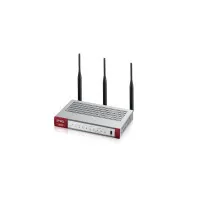





Presentation of product USG 20 specifications from brand ZyXEL
General Information
The ZyXEL USG 20 is a model from the brand ZyXEL, known for its quality and innovation in the networking sector. With the model USG 20 | 91-009-072006BUK, this device offers optimal performance, ensuring an enhanced user experience.
Network
This product does not have a built-in Wi-Fi connection, which may limit its flexibility of use. However, the ZyXEL USG 20 supports IPSec and SSL VPN protocols, thus ensuring a secure connection for your online data. With a data transfer rate of up to 1 Gbit/s and a throughput of 10/100/1000 Mbps, it allows for fast and efficient communication, meeting modern requirements. The 10/100/1000Base-T(X) cabling technology ensures a reliable connection suitable for various network needs.
Connectivity
The ZyXEL USG 20 is equipped with a USB 2.0 port for quick connection to your devices, as well as four Ethernet LAN ports (RJ-45), ensuring a stable and efficient network connection for multiple devices.
Security
This model integrates advanced security algorithms such as 3DES and DES, providing robust protection for your data. The authentication method used, including SHA-1 and SHA-2/MD5, allows for controlled and secure access to the network. Additionally, it is equipped with a built-in firewall for extra protection against online threats.
Design
The ZyXEL USG 20 features status indicators that allow for easy visualization of its operation, thus facilitating device monitoring.
Power
With an input current of 1.5 A and a typical power consumption of 15 W, this device ensures optimal performance while being energy-efficient. Its input voltage of 12 V ensures compatibility with standard electrical systems.
Weight and Dimensions
The dimensions of the ZyXEL USG 20 are 216 x 140 x 33 mm, allowing for easy adjustment in various workspaces. Weighing 380 g, it is light enough for easy handling.
Certification
This product has FCC Part15 (Class A) and CE EMC (Class A) certifications, attesting to its compliance with current safety and performance standards.
Environmental Conditions
The ZyXEL USG 20 operates within a temperature range of 0 to 40 °C, ensuring optimal performance in varied environments. It can also withstand similar non-operating conditions, and it is designed to operate in a relative humidity of 20 to 95 %.
Software
The software included with the ZyXEL USG 20 comes with a one-year license for Commtouch ContentFilter and AntiSpam, thus enhancing the user experience and network security.


